How does the notch count me down to my next meeting?
Once your calendar is connected, the notch counts down the last five minutes before each meeting, then asks whether to record it. Nothing is recorded unless you press Record now.
What shows up five minutes before?
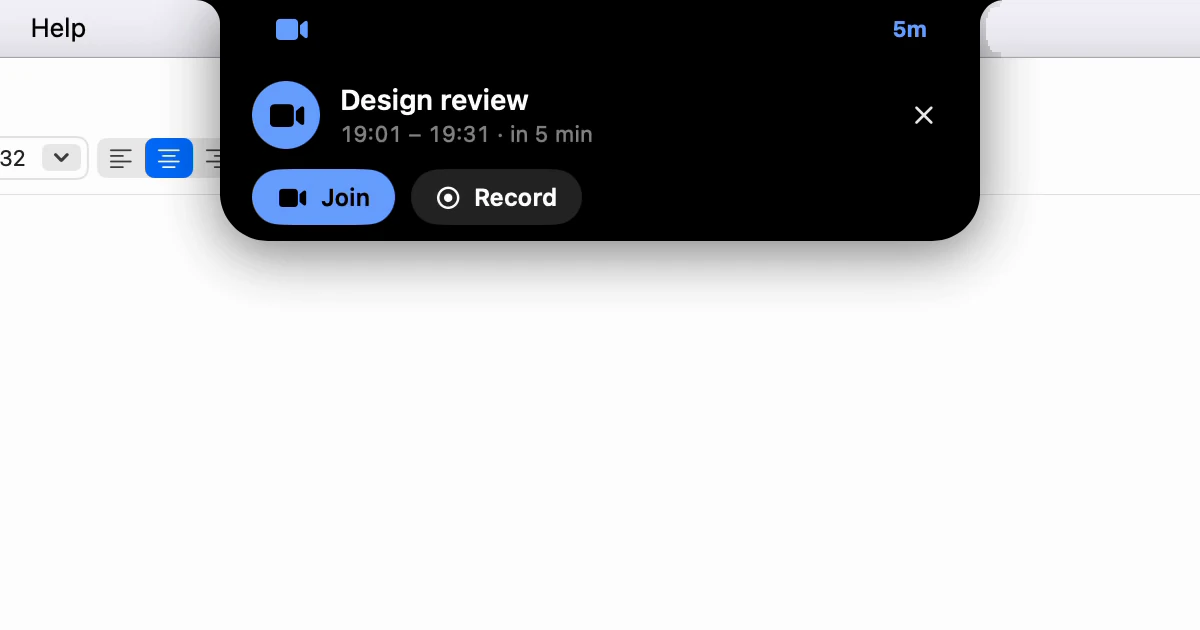
A small strip around the notch: a calendar on the left - a camera when the invite has a call link - and the minutes to go on the right. Once the meeting starts, the minutes turn into a dot. All-day entries, cancelled ones and anything you declined never appear.
Point at the strip and a card drops out with the meeting's title and time. Join opens the call; Record starts recording it. Record appears only when someone else is invited or there's a call link, so a dentist's appointment is a reminder, not a recording. Click elsewhere on the card to open it on the Meetings page.

When does it ask whether to record?
Just before the start, while Before a meeting starts is set to Ask whether to record - the default, in Settings ▸ Calendar. A card shows a ring with the time left, Record now, Skip, and a camera to join the call. The ring ends on the meeting's start time; Give me sets its length, from 15 seconds to a minute.
If the notch is already open, it arrives as a row along the bottom instead. Leave it, and the notch says "No answer, so nothing was recorded." Pressing Skip twice for the same recurring meeting is what makes Dictera stop asking about it; silence doesn't count.
And when the meeting ends?
A recording that outlives its meeting gets the ring in red, for a minute, with Keep recording and Stop. Here silence stops it, and the notes are written either way.
Can I turn it off?
Settings ▸ Notch has two switches under Meetings and AI Assistant. Count Down to the Next Meeting hides the five-minute strip. Turn off Ask About Meetings on the Notch, and the questions use a window of their own instead. To stop the questions, set Before a meeting starts to Do nothing.
The five-minute strip follows the eye, so with the eye set to visible, a meeting's title can reach a screen share. While the notch asks about a meeting, it keeps out of screen sharing and recordings by apps that respect the window privacy setting in macOS, whatever the eye says.
To connect a calendar, see Link your calendar so a recording starts on time. The rest is on the AI Assistant page, the notch page and in What's in the notch?