What do the colours on the notch mean while I dictate?
The colour says what happens to your words when you stop: white types them as you said them, green cleans them up first, purple translates them, and amber rewrites the text you selected. Red means your microphone is muted.
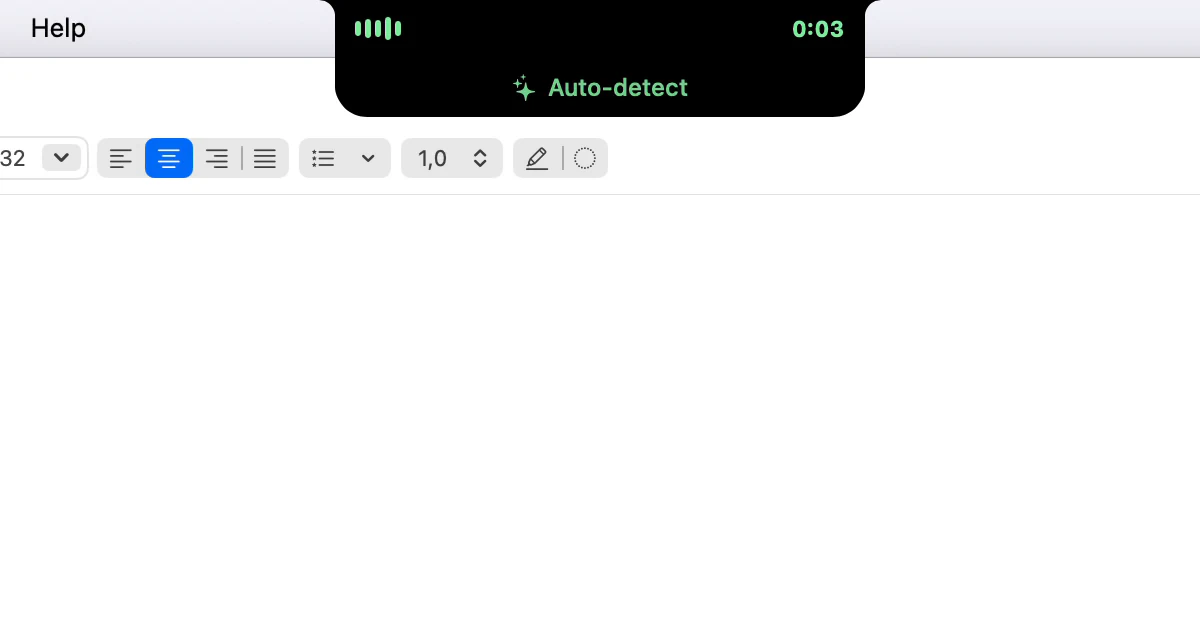
What does the strip show while I talk?
As soon as Dictera is listening, a small strip around the notch shows level bars on the left and the time on the right. When you stop, three dots mean it's working; a tick means the text went in. Then the strip goes back to whatever it showed before.
What does each colour mean?
The colour is set when the recording starts and doesn't change, so a glance at the start is enough.
- White - plain dictation. What you say is typed as you said it.
- Green - cleanup will run, so fillers go and punctuation is fixed before the text goes in. A sparkle beside the language says the same. Correct Selection, which records nothing, shows green while it works.
- Purple - a translation. The text comes back in another language.
- Amber - a voice edit. What you say is an instruction for Edit Selection, and it rewrites what you selected rather than adding to it.
The same colours mark the bars, the time, the dots and the tick, and the Dictate button on the open notch lights up in them too.
What is the small text under the notch?
It names the language the text will come back in: the language you pinned, or Auto-detect. A translation shows both, the one you speak and the one you'll get, so a wrong direction is caught before you say a word. A voice edit shows a pencil and, once heard, your instruction. With the Pill shape, it sits between the level and the time.
Why did it turn red?
Every microphone is muted, so nothing you say will be heard. Instead of a flat line, the strip shows a crossed-out microphone and says "Your microphone is muted". Click the Microphone button on the notch to unmute, and carry on.
Can I stop or cancel from there?
Point at the strip while it listens. A card drops out with Listening, the language, a cross that throws the recording away, and Stop, in the recording's colour, which types what you said.
Can I turn it off?
Turn off Show Dictation on the Notch in Settings ▸ Notch, and the floating indicator shows the same colours instead. For the rest of what the notch does, see What's in the notch?; for every way to dictate, the dictation page and the notch page.